1up
1upWhat if, on your commute or between meetings, you could grab just the key points of a long article or video on your phone? This guide maps the main ways to summarize with AI on mobile, looks at the time saved using research data, and finishes with picks by use case.

Want the bottom line first? Jump to picks by use case.
What is “AI summarizing”, and why is mobile demand rising?
AI summarizing analyzes long articles, papers, PDFs, or a video’s captions and distills only the important points. Increasingly this happens entirely in a phone app, so you can process things on the move without opening a PC — which is driving demand.
The reason it matters: we spend most of our content time reading and watching. Here is roughly how much you can save.
Time saved by summarizing (typical)
Sources: reading-speed meta-analysis, Brysbaert (2019, 190 studies / 18,573 participants); article length, Orbit Media 2024; video length, Statista (YouTube ~12 min avg); book length, NYT bestseller average (273 pages). Reduction varies by content.
The main ways to summarize on your phone
There are four main approaches on mobile, each with a different sweet spot.
General AI chat (ChatGPT, Gemini, Claude) summarizes whatever text or URL you paste, and most have a free tier — handy for tidying up text you already have. Pulling in YouTube captions, or handling a PDF or a 10,000-word page on a phone, tends to mean extra copy-pasting and splitting, or running into input limits.
Transcription tools (e.g. Notta) turn meeting and call audio into text and summarize the transcript. They shine for meeting minutes, but they aren’t built to summarize web articles, PDFs, or books.
Book-summary services (e.g. Blinkist) give you professionally written summaries from a catalogue, mostly of business titles. If the book you want is in the library, you get the gist fast. The trade-off: you’re limited to the titles the service has chosen, not the web page, video, or PDF in front of you.
Dedicated summarizers and browser extensions are plentiful. Many are PC-first, though, so how well they work on a phone alone varies by tool.
| Type | Phone-only | Web/Video/PDF/Book | Languages | Time saved shown | Free tier | Speed |
|---|---|---|---|---|---|---|
| General AI chat | △ | △ (manual paste) | ○ | ✕ | ○ | ○ |
| Transcription | ○ | Audio-centric | △ | ✕ | △ | ○ |
| Book summaries | ○ | Books only | △ | ✕ | △ | ○ |
| TimTim Browser | ◎ | ◎ (all four) | ◎ (54 langs) | ◎ (time/money) | ○ | ◎ |
Specs can change; please confirm current support on each official source.
For format-specific comparisons, see PDF, YouTube and research papers.
Picking by use case
There is no single “best” — the right tool depends on how you work. Follow the flow below.
TimTim Browser is for you if…
The tool our editors found especially handy is TimTim Browser. It fits people where “phone-only × many content types × many languages” overlap.
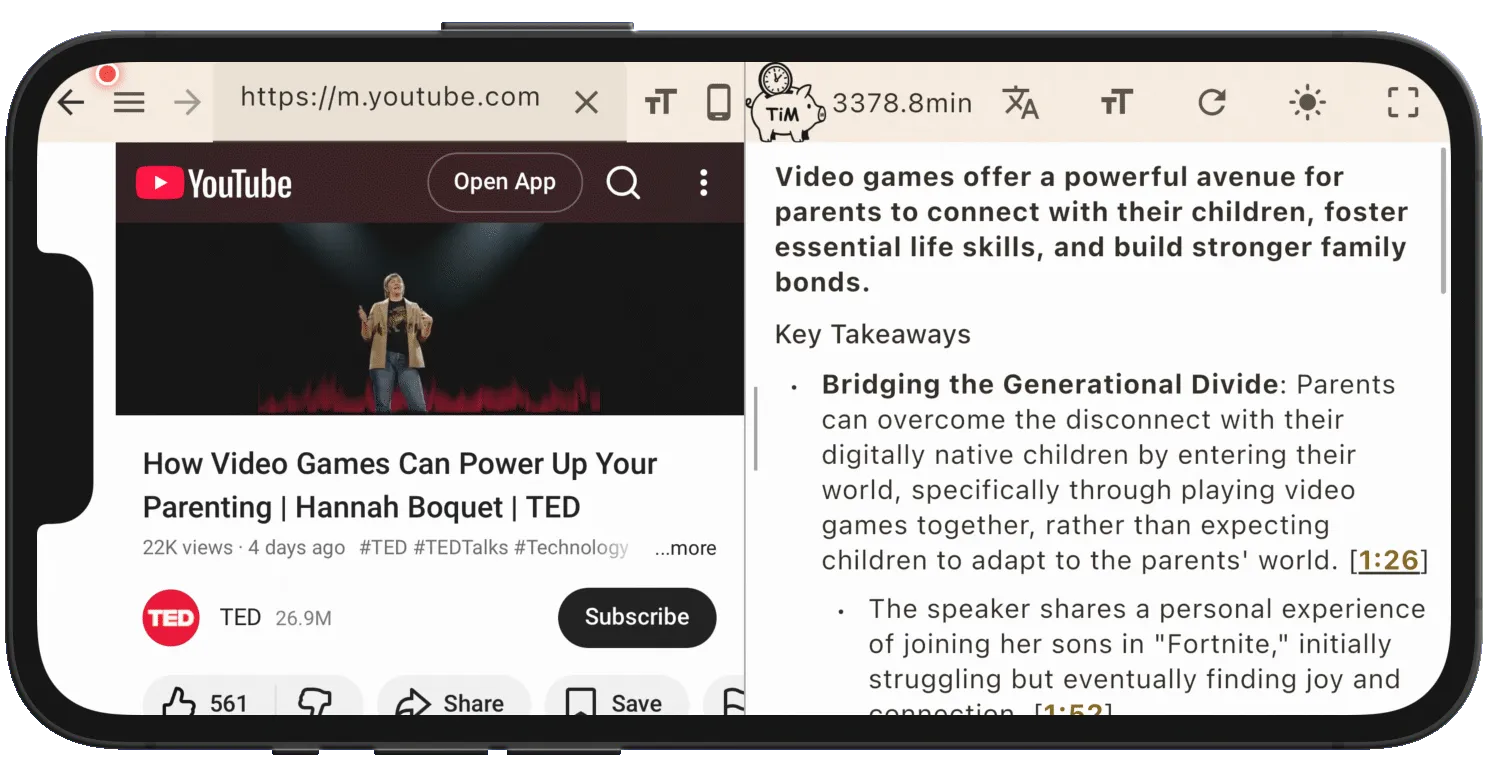
- All on one phone: open a page in the built-in browser and summarize on the spot — even on the move.
- Breadth: YouTube (caption + timestamped summary, ~2s) / Amazon book analysis / PDF / web articles.
- Time saved, quantified: shows minutes saved and the money-equivalent at your hourly rate.
- Multilingual: summaries in 54 languages — read foreign articles and videos in your own.
- Free to start: free to use; unlimited via subscription.
- Fast & privacy-aware: streaming responses; private content isn’t shared-cached by design.
In short
On mobile, different methods shine for different jobs: transcription for meetings, book-summary services for pre-made titles. If you want phone-only, many content types, and many languages in one app, TimTim Browser is a strong pick. Try it on your own content with the free tier first.